mcpblox: Transform and Compose MCP Servers with Unix Pipes
I’ve been building and using MCP servers for months now, and a recurring frustration finally pushed me to build something: I kept wanting to reshape MCP servers without modifying them. Rename a tool. Hide the ones I don’t need. Combine two tools into one. Simple transformations that shouldn’t require forking a repo or writing adapter code.
So I built mcpblox, a programmable MCP proxy that takes any existing MCP server and a natural language transform prompt, and produces a new MCP server with reshaped tools. It’s on npm and Apache 2.0 licensed.
(I really wanted the name “mcpipes” but it was taken. “mcp-lego” would have been… legally interesting.)
The Problem
Most MCP servers are designed for general use. They expose a lot of tools, often with verbose names and schemas that don’t quite fit your specific workflow. You end up with tools you don’t need cluttering your agent’s context, naming conventions that don’t match your preferences, and no way to combine multiple upstream tools into the single composite operation you actually want.
The traditional fix is to write a wrapper server by hand. That works, but it’s tedious, fragile, and you lose the ability to iterate quickly. What I wanted was something more like the Unix philosophy: small, composable transformations you can chain together.
How It Works
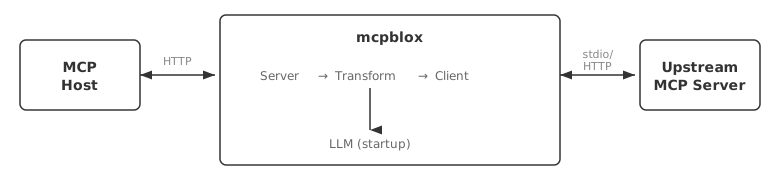
The core idea is simple. mcpblox sits between your MCP host and an upstream MCP server. At startup, it:
- Connects to the upstream server and discovers all its tools
- Sends your natural language transform prompt plus the tool definitions to an LLM
- The LLM produces a structured transform plan—which tools to rename, modify, hide, or compose into new synthetic tools
- For each transform, the LLM generates JavaScript functions that run in a sandboxed
vmcontext - The result is cached, so subsequent startups with the same prompt skip the LLM entirely
At runtime, tool calls flow through the transform pipeline. Input arguments get transformed, the upstream tool is called, and the output is transformed before returning to the host. Pass-through tools are proxied directly with zero overhead.
A Simple Example
Take the yfinance MCP server—a great tool for financial data that exposes several tools, all prefixed with yfinance_. To strip that prefix:
npx mcpblox \
  --upstream "uvx mcp-server-yfinance" \
  --prompt "Remove the yfinance_ prefix from all tool names" \
  --api-key $ANTHROPIC_API_KEY
That’s it. You now have a proxy MCP server where yfinance_get_price is just get_price. Point any MCP host at http://localhost:8000/mcp and you’re done.
The Real Power: Composition via Unix Pipes
A single transformation is useful. But the real power comes from chaining them—just like Unix pipes.
When mcpblox detects its stdout is a pipe, it binds to an OS-assigned port and writes its URL to stdout. The next mcpblox instance reads that URL from stdin as its upstream. No explicit --upstream flag needed.
mcpblox --upstream "uvx mcp-server-yfinance" \
    --prompt "Remove the yfinance_ prefix from all tool names" \
  | mcpblox \
    --prompt "Create a new tool called compare_stocks that takes two tickers and returns price, market cap, and 52-week range for both"
The first stage strips the prefix. The second stage creates an entirely new synthetic tool that composes multiple upstream calls. Each stage is cached independently—change the second prompt and only the second stage regenerates.
This lets you build up elaborate transformations from simple, understandable steps. The composition model is the same one that makes Unix powerful: complex behavior from simple, composable parts.
Synthetic Tools
This is where things get interesting. The --prompt isn’t limited to renaming or hiding. You can ask mcpblox to create entirely new tools that orchestrate multiple upstream tool calls.
For example, a prompt like:
Create a tool called
get_period_returnsthat callsget_price_historyfor 1-month, 3-month, 6-month, and 12-month periods, and returns calculated returns for a given ticker.
This generates a synthetic tool with its own schema and an orchestration function that calls the upstream tool multiple times, aggregates the results, and returns a clean response—all from a single natural language description.
Slap a UI on It
In my previous work on generative UI for MCP, I made mcp-generative-ui pipe-friendly too, so you can cap off a pipeline with a UI:
mcpblox --upstream "uvx mcp-server-yfinance" \
    --prompt "Remove yfinance_ prefix" \
  | mcpblox \
    --prompt "Create compare_stocks tool; hide all tools except compare_stocks and get_price_history" \
  | mcp-gen-ui
The result: a base MCP server, transformed and composed through two pipeline stages, with a generated interactive UI on top. The compare_stocks tool renders a graphical comparison instead of raw JSON. All from a shell one-liner with good old Unix pipes.
Try It
npx mcpblox --help
The repo is open and Apache 2.0 licensed. I’d love to hear what transformations and compositions you come up with.